Sprocket Sports
- 3.4
- Rating
- 50.00K
- Installs
- Free
- Price

 Analysis by App-foxy
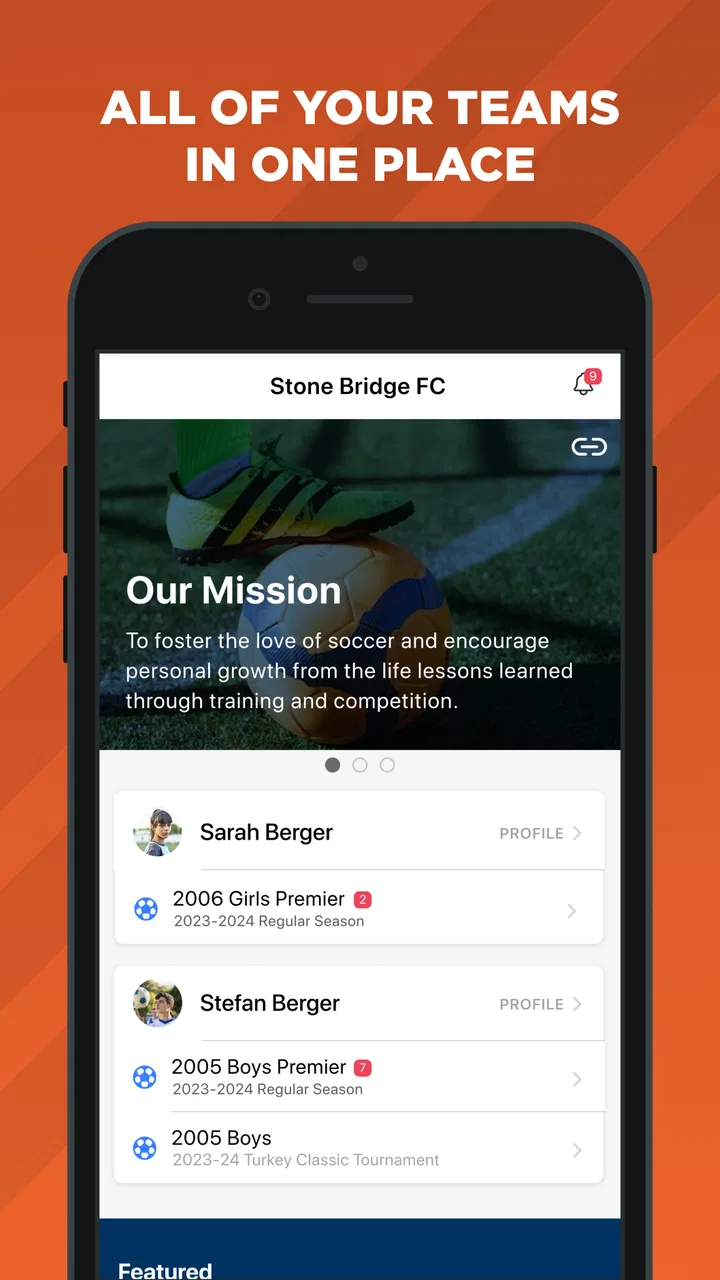
When a household has children, parents, coaches, and several weekly activities to coordinate, sports administration can become surprisingly messy. I tested Sprocket Sports with that kind of shared-use situation in mind: one person may handle registration, another may need team information, and the athlete may simply want to know what is happening next. The app is free, aimed at sports enrollment and team management, and developed by Sprocket Sports. My overall impression is that it is most useful when a club or organization already relies on the Sprocket system, rather than as a general-purpose sports calendar that anyone can adopt independently.
That distinction matters. I would not install it expecting a broad directory of local teams or a replacement for every messaging app a club might use. Its value comes from bringing participation and team-related administration into one place. For a family, that can reduce scattered messages and forgotten enrollment steps. For a coach or organizer, it can offer a more structured way to keep sports information connected to the people involved.
How Sprocket Sports fits into a shared household
The clearest everyday scenario is a parent managing more than one child’s sports involvement from a phone while another adult also needs access to the same information. A registration task might be completed by one person, while the other checks team details or helps a child prepare for the next activity. In that situation, the app can be more practical than keeping everything in email threads, screenshots, and separate notes.
You May Also Like

 AccuWeather: Weather Radar
AccuWeather Review: A Quick, Clear Forecast for Everyday Decisions
For everyday plans, the best forecast is the one you can understand quickly. AccuWeather makes rain timing, radar, and local conditions easy to act on, with a few trade-offs.

 Hill Climb Racing
Why Hill Climb Racing Still Turns Crashes Into One More Run
A tiny car, a bumpy hill and one more upgrade: Hill Climb Racing keeps resurfacing because its simple chaos makes every near-miss feel personal.

 AliExpress - Shopping App
AliExpress Makes Global Shopping Feel Personal, but Shoppers Bear the Risk
AliExpress turns a global marketplace into a pocket-sized discovery engine. Its reach is useful, its shopping loop compelling, and its trade-offs easy to miss.

 Lords Mobile: Kingdom Wars
Lords Mobile Is a Kingdom-Building Routine, Not a Quick Match
A case-by-case verdict on the building, battles, device demands, and social commitments that make Lords Mobile rewarding for some players and exhausting for others.

 PDF Scanner app - TapScanner
TapScanner Makes Paperwork Easier to Capture, Check, and Share
TapScanner makes scanning with a phone feel less like a rescue operation and more like a dependable step in getting work done. Its capture tools are useful, though not flawless.

 Block Blast!
 Shows How Much a Puzzle Game Can Leave Out
A quiet grid game shows why puzzle players increasingly value instant clarity, repeatable skill and low-pressure play—and where the genre still needs to catch up.
More From Our News Desk
View All News


I found the main benefit less about flashy presentation and more about reducing the number of places a family has to check. Sports participation usually combines enrollment, team organization, and ongoing communication. When those pieces are handled through the same platform, it becomes easier to keep the administrative side attached to the correct sports activity instead of mixing it with unrelated household reminders.
There is also a useful difference between a shared device and a shared account. A family tablet or a parent’s phone may be used by several people, but that does not automatically mean everyone should work inside one account. Before handing the device to a child, I would make sure the correct person is signed in and that the child only sees information appropriate to their role. The app is rated for Everyone, but that age label should not be confused with independent account management for every child.
For a household with one athlete and one responsible adult, the experience is likely to be relatively straightforward. Families with multiple children should be more deliberate. Keeping each participant associated with the right team or enrollment is important, especially when two children play different sports or belong to different groups. A rushed setup can create confusion later, even if the app itself is working correctly.
One practical habit I recommend is deciding who owns each task before opening the app. One adult can handle enrollment and account maintenance, while another can be responsible for checking team-related updates. That simple division avoids the common problem of two people editing or checking the same information without knowing who completed the task.
What the first setup feels like
The first step is not simply downloading the app and browsing. Sprocket Sports makes the most sense when connected to an organization’s sports enrollment or team-management process. I would therefore install it after receiving clear instructions from the relevant club, league, or program, rather than treating it like a standalone discovery tool.
That creates an important boundary for shared devices: the adult who begins setup should know whose participation is being registered and which organization is involved. If the phone is also used for another family member’s activities, pause before accepting or entering anything that belongs to the wrong participant. A short check at the beginning can prevent a much longer cleanup later.
I also suggest using a consistent household routine. Complete enrollment in a quiet moment, confirm the participant’s details, and then let other family members use the app for viewing or coordination. Trying to register a child while commuting, supervising another child, or switching rapidly between accounts is exactly the kind of situation where mistakes become more likely.
The app’s current version is 6.0.8, and it runs on devices using Android 8.0 or later. That makes it accessible on many older Android phones, which is useful if the household has a shared or hand-me-down device rather than a recent flagship. Still, an older compatible phone may feel less comfortable for frequent administrative work, so I would use the larger or more reliable household device for initial setup when possible.
Because the app is free, the decision to try it does not involve a purchase commitment. That is helpful for families who want to test whether it fits their organization’s workflow. The more important question is not cost but adoption: if the club does not use Sprocket Sports as part of its process, the app may have limited practical value for that family.
Keeping coordination in one place without overcomplicating it
Sports coordination is where this app earns its place. A team-management platform can give a family a more organized reference point than a chain of informal messages. Instead of asking which version of a schedule is current or searching through old conversations for enrollment information, I would first check the relevant area of the app and then use other communication tools only when a personal conversation is needed.
That workflow is especially useful when two adults share responsibility. One person may be at work while the other is handling school pickup. If both know where sports information is expected to appear, they do not need to forward every message manually. The app becomes a common reference point, even though each adult may use it at a different time.
My first non-obvious tip is to treat the app as the source for structured sports administration, not as a complete replacement for household planning. I would still keep a simple family calendar for school events, medical appointments, transport, and other commitments. Sprocket Sports is better suited to the sports organization’s information than to representing the entire family’s life.
My second tip is to use a short weekly check rather than opening the app constantly. A parent can review the current sports information at a predictable time, then tell the child what matters for the next few days. This is less stressful than reacting to every notification or relying on memory. It also gives the household a chance to notice whether the correct participant and team are being viewed.
My third tip concerns handoffs. If one adult is unavailable, the other should be able to continue without guessing what has already been done. A brief household note such as “enrollment completed” or “team information checked” can be more useful than repeatedly performing the same action. The app helps organize the sports side, but it does not remove the need for clear family communication.
There is a trade-off here. Centralization reduces scattered information, but it also means the family becomes more dependent on the organization using the platform consistently. If coaches, administrators, and parents continue to use several unrelated channels, the app cannot magically eliminate duplication. In that case, its usefulness depends on which channel contains the most current information.
Account boundaries, children, and trust
For a child using a shared phone, I would keep the adult account boundary clear. The Everyone content rating makes the app broadly suitable from an age-classification perspective, but younger users may still need an adult to handle registration, participant details, and decisions connected to organized sports. A child can be shown the information they need without being made responsible for every administrative step.
This is also where trust matters more than convenience. I would not pass a logged-in device around casually if it contains information for more than one participant. Before another family member uses the phone, check which account or profile is active. Afterward, return to the household’s normal account rather than leaving the device in an ambiguous state.
Sprocket Sports is a better fit for families that are comfortable assigning responsibility clearly. It is less suitable for a household that expects every person to see exactly the same thing without any attention to account boundaries. Shared access can be convenient, but it should be intentional. The app may support sports coordination, while the family still needs its own rules about who can enroll, change information, or communicate on someone else’s behalf.
For teenagers, I would use the app as a tool for increasing awareness rather than transferring all responsibility at once. Letting a teenager check their team information can encourage independence. However, an adult should remain involved in anything involving enrollment or important personal details. That balance works well because the athlete learns where to look, while the adult retains oversight of decisions that affect participation.
Another useful distinction is between visibility and control. A child may need to know when an activity is happening, but that does not mean they need to manage the household’s entire sports account. Keeping those roles separate reduces accidental changes and makes it easier to explain who should take action when something needs updating.
Where it is stronger than familiar alternatives
The usual alternative is a mixture of email, group chats, paper forms, and a general calendar. Those tools are flexible, but they often separate enrollment from team information. A message may explain what to do, while a form handles registration and a calendar stores the date. That arrangement can work for a small group, yet it places the burden of organization on the parent.
Sprocket Sports has a more focused purpose. Because it is built around sports enrollment and team management, it can make more sense than a generic notes app when the organization already uses it. The advantage is not that it replaces every tool; it is that it gives the sports relationship a dedicated home.
Compared with a general family organizer, the trade-off is specialization. A family organizer may be better for chores, meals, shared shopping, and transport. Sprocket Sports is more relevant to the club or team context. I would use the two together if necessary rather than forcing one app to handle jobs it was not designed to handle.
Compared with a messaging group, the app should be easier to treat as an organized administrative reference. A chat is excellent for quick questions and urgent conversation, but older information can disappear under newer messages. The platform approach is more suitable for keeping sports participation connected to the team structure, provided the organization maintains that information properly.
That final condition is important. If a team communicates almost entirely through text messages and rarely updates its platform, a family may gain little by checking the app. Before asking every household member to adopt it, I would confirm that the club actually expects parents and athletes to use Sprocket Sports. Adoption by the organization is the deciding factor.
Everyday friction I noticed
The app’s focus can feel narrow if you are looking for a universal sports companion. I would not choose it for personal training logs, exercise tracking, match analysis, or broad sports news. Its role is administrative and team-oriented, so people seeking individual fitness tools may find it too limited for their goals.
There is also a learning curve created by shared responsibility. A parent may understand the enrollment process while a child only wants the information relevant to them. Without a simple household agreement, people can open the app at the wrong time, look at the wrong participant, or assume that another person completed a task. This is not necessarily a flaw in the software, but it is a real part of using a team platform in a busy family.
Another limitation is that a dedicated platform does not automatically make unclear sports administration clear. If an organization changes its process, sends mixed instructions, or uses several systems at once, the family may still need to ask questions. I appreciate the app more when it is part of a disciplined club workflow; I am less enthusiastic when it is added as one more place to check.
The average rating is 3.4 from around 86 ratings, with roughly 40 written reviews. I read that as a sign to keep expectations practical rather than assuming the experience will be perfect for every organization. The app has attracted over 50 thousand installs, so it is not an obscure experiment, but the fit between the platform and the local sports program remains more important than its overall reach.
Those figures also explain why I would test it with one household workflow before asking everyone to depend on it. Install it, complete the relevant setup, and see whether the organization’s information is actually useful and current. If the process feels clear, expand its use. If it creates duplicate work, keep the app limited to the tasks it handles best.
Who should use it and who should look elsewhere
I would recommend Sprocket Sports to parents managing organized youth sports when the club or league has made it part of its enrollment and team-management process. It is also a reasonable choice for households that want a shared sports reference point without adding every sports detail to a general family calendar.
It suits families that can establish clear account roles, especially those sharing one phone or tablet. It can also help when one adult handles administration and another needs dependable access to the same team context. The free price makes trying it easy, and the Everyone rating removes an age-classification barrier for ordinary household use.
I would skip it if you are looking for a standalone workout planner, a personal scoreboard, or a complete family organizer. I would also hesitate if your club does not actively use it. In that case, a simple calendar and the organization’s established communication channel may be less confusing than introducing a platform that does not contain the information you need.
For a single adult managing one athlete, the app may feel appropriately focused. For a large household with several children, it can still work, but only if everyone agrees on who manages each participant and where the final information should be checked. The more complicated the family structure, the more valuable those boundaries become.
My household verdict
After using Sprocket Sports as a sports administration tool rather than a general-purpose app, I see a clear but specific benefit. It can give families a more organized connection to enrollment and team management, particularly when the sports organization is committed to using it. That makes it more useful than scattered messages for certain workflows, while still leaving room for a family calendar and ordinary conversation.
I would recommend starting with one responsible adult, one correctly identified participant, and one complete enrollment or team-related task. Once that works, show the athlete where to find the information they need, then decide which adult will handle changes and follow-up. This staged approach is the safest way to make a shared device useful without blurring account responsibility.
My final opinion is positive but conditional: Sprocket Sports is worth using when it matches the club’s actual process. It is free, available for Android 8.0 and later, and focused enough to help with organized sports coordination. It is not the right answer for every household or every sports need, but for families trying to keep enrollment and team information from getting lost across chats and emails, it can become a sensible part of the weekly routine.
FAQs for Sprocket Sports
01What is Sprocket Sports and what does it offer?
Sprocket Sports is a comprehensive app designed for sports enthusiasts, offering features like live scores, team management, and event scheduling. It allows users to track their favorite sports, connect with teams, and manage sporting events seamlessly. Whether you're a player, coach, or a fan, Sprocket Sports aims to enhance your sports experience.
02Is Sprocket Sports free to use or does it require a subscription?
Sprocket Sports is available for free with basic features. However, it offers a premium subscription for users who want access to advanced features like detailed analytics, ad-free browsing, and personalized content. The premium version is ideal for teams and sports clubs looking for enhanced functionality.
03How user-friendly is Sprocket Sports for beginners?
Sprocket Sports is designed with a user-friendly interface, making it accessible for beginners. It includes tutorials and guides to help users navigate through its features. The app’s intuitive design ensures that even users with minimal tech experience can easily manage teams and events.
04Can Sprocket Sports be integrated with other platforms or devices?
Yes, Sprocket Sports supports integration with various platforms and devices. It can sync with calendars, social media, and even fitness trackers. This cross-platform compatibility allows users to manage their sports activities efficiently across different devices, enhancing overall usability.
05What types of sports are supported by Sprocket Sports?
Sprocket Sports supports a wide range of sports, including soccer, basketball, baseball, and more. It continuously updates its database to include emerging sports and leagues. This wide coverage ensures that users can track and manage almost any sport they are interested in.
Pros
- User-friendly interface for quick navigation.
- Real-time updates keep you informed.
- Customizable notifications for events.
- Secure payment processing for fees.
- Integrates well with social media.
Cons
- Limited offline functionality.
- Occasional sync issues reported.
- No dark mode available.
- Requires high-speed internet.
- Some features hidden behind paywall.

Sprocket Sports
Gallery